<< Previous | Home | Next >>

NETGEAR FVS336G


I have been using NETGEAR's FVS336G as the gateway to my little sub-net for a couple of months now, and I must say that, thus far, I am thoroughly pleased. It is a rock solid piece of equipment with a great feature set, and I give it my nod of approval...
Tags :
Social Bookmarks :  Add this post to Slashdot    Add this post to Digg    Add this post to Reddit    Add this post to Delicious    Add this post to Stumble it    Add this post to Google    Add this post to Technorati    Add this post to Bloglines    Add this post to Facebook    Add this post to Furl    Add this post to Windows Live    Add this post to Yahoo!

Export this post as PDF document  Export this post to PDF document

SyntaxHighlighter

Wyatt's Blog is now using SyntaxHighligher from Google Code

var thing = document.createElement('div');
thing.classname = "asdf";
alert(thing.classname);
for(var i = 0; i < 10; i++) {
    alert('hello');
}

UPDATE - 2011-11-19:
Some time ago Alex Gorbatchev moved SyntaxHighlighter from Google Code to its own site - http://alexgorbatchev.com/SyntaxHighlighter - this is the URL you want to use.

Social Bookmarks :  Add this post to Slashdot    Add this post to Digg    Add this post to Reddit    Add this post to Delicious    Add this post to Stumble it    Add this post to Google    Add this post to Technorati    Add this post to Bloglines    Add this post to Facebook    Add this post to Furl    Add this post to Windows Live    Add this post to Yahoo!

Export this post as PDF document  Export this post to PDF document

Installing Stunnel on CentOS 5

Stunnel is a program that allows you to encrypt arbitrary TCP connections inside SSL available on both Unix and Windows. Stunnel can allow you to secure non-SSL aware daemons and protocols (like POP, IMAP, LDAP, etc) by having Stunnel provide the encryption, requiring no changes to the daemon's code.

To install Stunnel on CentOS 5:
  1. Download the latest source tarball (stunnel-4.25.tar.gz as of 2008-07-22) from http://www.stunnel.org/download/source.html to /tmp.
  2. cd /tmp
  3. gzip -dc stunnel-#.##.tar.gz | tar -xvf -
  4. cd /stunnel-#.##
  5. ./configure
  6. make
  7. make install
Tags : ,
Social Bookmarks :  Add this post to Slashdot    Add this post to Digg    Add this post to Reddit    Add this post to Delicious    Add this post to Stumble it    Add this post to Google    Add this post to Technorati    Add this post to Bloglines    Add this post to Facebook    Add this post to Furl    Add this post to Windows Live    Add this post to Yahoo!

Export this post as PDF document  Export this post to PDF document

ThinkingRock

Getting super organized the easy way
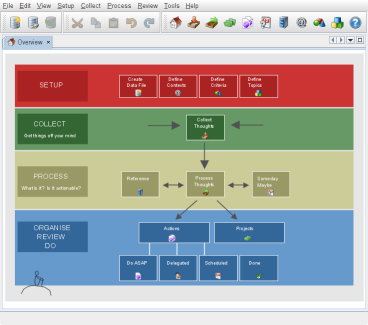
Thinking Rock Overview Screen

ThinkingRock is a GTD software tool, that can help you get super organized! I am addicted. I've spent hours working with it, and the more I've used this software, the more impressed I am...

You can find the software here (www.thinkingrock.com.au)

ThinkingRock's Java client feels a tad sluggish on Windows, but definitely not horrendous and being cross platform is a real bonus. I do wish it could read/write it's XML data across a network, but even file-based it's really impressive. It took me a bit of poking and prodding in the UI after watching their tutorials before I had it figured out, but really the concepts are rather straight forward. I do recommend their demos.

Tags :
Social Bookmarks :  Add this post to Slashdot    Add this post to Digg    Add this post to Reddit    Add this post to Delicious    Add this post to Stumble it    Add this post to Google    Add this post to Technorati    Add this post to Bloglines    Add this post to Facebook    Add this post to Furl    Add this post to Windows Live    Add this post to Yahoo!

Export this post as PDF document  Export this post to PDF document